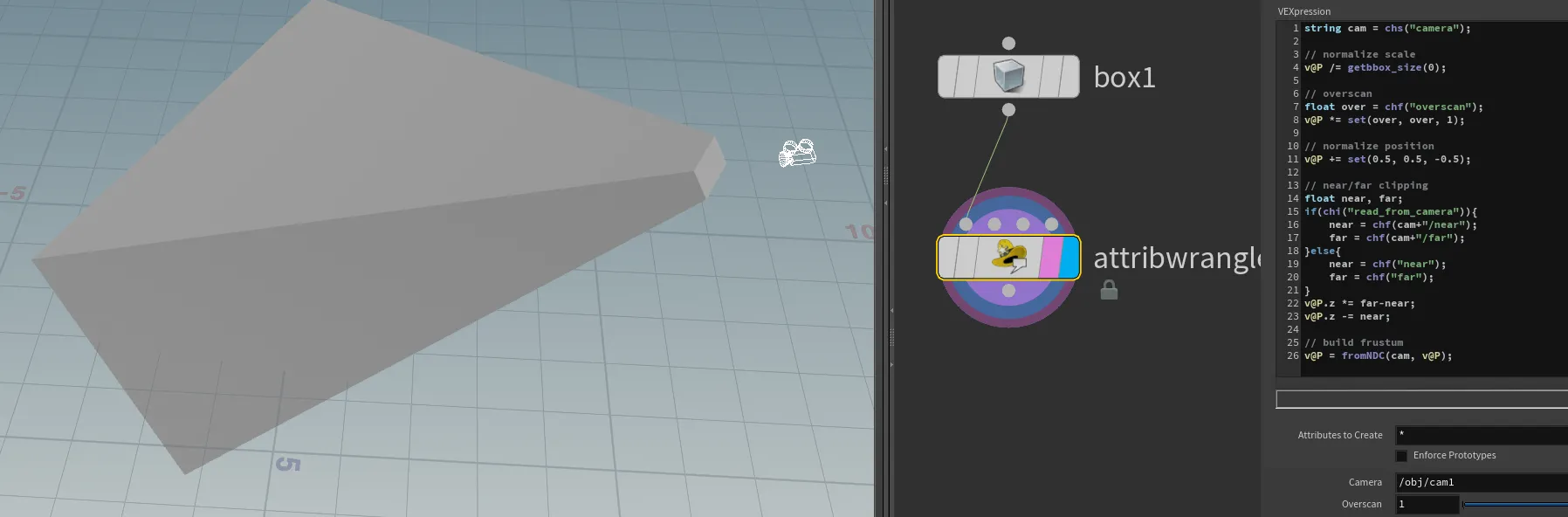
camera frustum
At the time of writing, Houdini does not provide a built-in camera frustum solution, as many VFX studios have their own implementations. I have seen many over-complicated solutions out there, so here is my take on it â simple and effective.
Instead of creating geometry from scratch, we can use existing geometry, like a box, and modify it into a frustum shape. We can utilise the NDC (Normalised Device Coordinates) function for this, by pretending that our incoming geometry is within the NDC space, and then converting it back to world space.
What is NDC? Normalized Device Coordinates (NDC) is a coordinate system that standardizes the range of values for object coordinates. In NDC space:
The x and y coordinates range from -1 to 1. The z coordinate ranges from 0 (near plane) to 1 (far plane). This normalisation allows for easy manipulation and transformation of objects within a predictable space.
string cam = chs("camera");

// normalize scale
v@P /= getbbox_size(0);

// overscan
float over = chf("overscan");
v@P *= set(over, over, 1);

// normalize position
v@P += set(0.5, 0.5, -0.5);

// near/far clipping
float near, far;
if(chi("read_from_camera")){
    near = chf(cam+"/near");
    far = chf(cam+"/far");
}else{
    near = chf("near");
    far = chf("far");
}
v@P.z *= far-near;
v@P.z -= near;

// build frustum
v@P = fromNDC(cam, v@P);