
Displaying Vector Fields in COPs
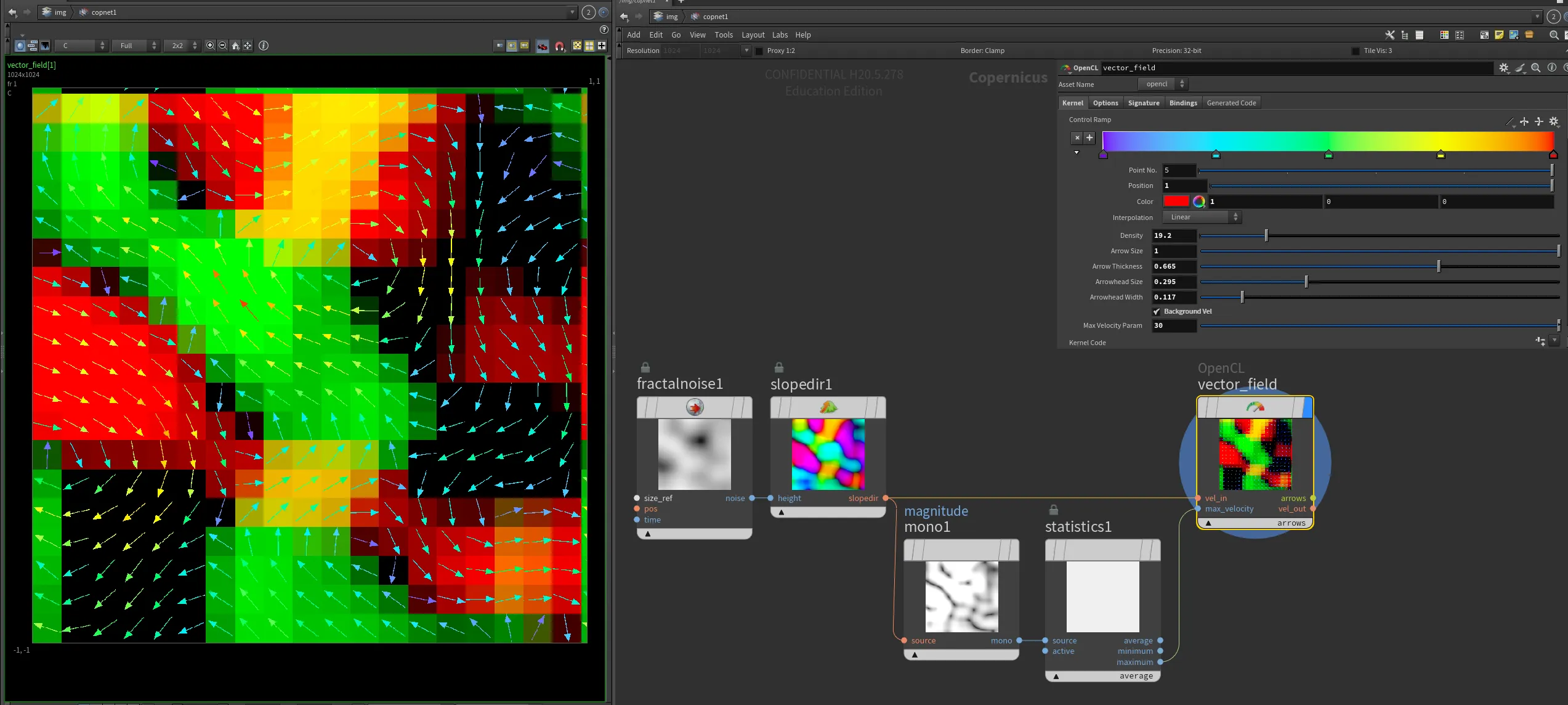
With powerfull COPs, where we can create a 2d solver, it would be great to have the ability to display vector fields directly in COP network. Therefore, I have created an OpenCL node that draws arrows to visualize an input 2D vector (float2) field.
Here's the OpenCL code for the node:
#bind layer vel_in? float2
#bind layer max_velocity? float
#bind layer !&vel_out float2
#bind layer !&arrows float4
#bind ramp control_ramp float3 val=0
#bind parm density float val=1
#bind parm arrow_size float val=1
#bind parm arrow_thickness float val=2
#bind parm arrowhead_size float val=0.1
#bind parm arrowhead_width float val=0.05
#bind parm max_velocity_param float val=10.0
#bind parm background_vel int val=1

bool pointInTriangle(float2 pt, float2 v1, float2 v2, float2 v3)
{
    float2 d1 = v2 - v1;
    float2 d2 = v3 - v2;
    float2 d3 = v1 - v3;

    float2 p1 = pt - v1;
    float2 p2 = pt - v2;
    float2 p3 = pt - v3;

    float cross1 = d1.x * p1.y - d1.y * p1.x;
    float cross2 = d2.x * p2.y - d2.y * p2.x;
    float cross3 = d3.x * p3.y - d3.y * p3.x;

    return (cross1 >= 0 && cross2 >= 0 && cross3 >= 0) || (cross1 <= 0 && cross2 <= 0 && cross3 <= 0);
}

@KERNEL
{
    float2 region = convert_float2(@res) / @density;
    float2 fxy = convert_float2(@ixy);

    // Determine the section index
    int2 section_index = convert_int2(floor(fxy / region));

    // Compute the center of the section
    float2 section_center = convert_float2(section_index) * region + region / 2.0f;

    // Sample the velocity at the center of the section
    float2 velocity = @vel_in.bufferSample(section_center);

    // Pass through the velocity to the output layer
    @vel_out.set(@vel_in.bufferSample(fxy));

    // Compute the direction and magnitude of the velocity
    float magnitude = length(velocity);
    float angle = atan2(velocity.y, velocity.x);

    // Attempt to retrieve the maximum velocity from the max_velocity layer, fallback to max_velocity_param if unsuccessful
    float max_velocity = @max_velocity_param;
    if (@max_velocity.bound)
    {
        max_velocity = @max_velocity.bufferSample(convert_float2(0));
    }

    // Calculate the maximum arrow length to fit within the section, ensuring both the stem and arrowhead fit
    float max_arrow_length = @arrow_size * min(region.x, region.y);

    // Calculate the start and end points of the arrow
    float2 arrow_start = section_center - (float2)(cos(angle), sin(angle)) * 0.5f * max_arrow_length;
    float2 arrow_end = section_center + (float2)(cos(angle), sin(angle)) * 0.5f * max_arrow_length;

    // Calculate arrowhead points
    float2 arrow_dir = normalize(arrow_end - arrow_start);
    float2 arrow_perp = (float2)(-arrow_dir.y, arrow_dir.x); // Perpendicular to arrow direction
    float2 arrowhead_left = arrow_end - arrow_dir * @arrowhead_size * max_arrow_length + arrow_perp * @arrowhead_width * max_arrow_length;
    float2 arrowhead_right = arrow_end - arrow_dir * @arrowhead_size * max_arrow_length - arrow_perp * @arrowhead_width * max_arrow_length;

    // Normalize magnitude using the computed maximum velocity
    float normalized_magnitude = clamp(magnitude / max_velocity, 0.0f, 1.0f);

    // Set the color based on the normalized velocity magnitude using the ramp
    float4 color = (float4)(@control_ramp(normalized_magnitude), 1.0f);

    // Determine if the current pixel is part of the arrow shaft
    float2 dir = normalize(arrow_end - arrow_start);
    float2 to_pixel = fxy - arrow_start;
    float projection_length = dot(to_pixel, dir);
    float2 projection = dir * projection_length;
    float2 arrow_to_pixel = to_pixel - projection;

    bool on_arrow_shaft = projection_length >= 0.0f && projection_length <= length(arrow_end - arrow_start) && length(arrow_to_pixel) <= @arrow_thickness;

    // Determine if the current pixel is part of the arrowhead
    bool on_arrowhead = pointInTriangle(fxy, arrow_end, arrowhead_left, arrowhead_right);

    // Initialize to zero to ensure no stray values
    @arrows.set(0);

    if (on_arrow_shaft || on_arrowhead)
    {
        @arrows.set(color);
    }
    else if (@background_vel == 1)
    {
        @arrows.set((float4)(velocity, 0.0f, 1.0f)); // Pass through the velocity as background
    }
}
This OpenCL kernel visualizes a 2D vector field by drawing arrows to represent the direction and magnitude of the vectors. The code uses various parameters to control the appearance and behavior of the arrows, such as their size, thickness, and color.
By incorporating this OpenCL node into your COPs workflow, you can effectively visualize vector fields, providing a powerful tool for analyzing and understanding complex 2D data.
This is of course not the only way of achieving this effect. An alternative could be stamping arrow shapes onto points in the Copernicus network.
 opencl-vector-vis-1.hipnc